
The Studio Notes 2, #5 Keeping Track
Project work flow (Under the hood of CPM)


Since starting the TSN’s, a frequent question has been what do I use to organise and ‘run’ my day to day in the studio. I touched on some of the tools I use in the first series, but thought today would be a good time to dig a little deeper into the specifics of how I track a project.
Notion is the backbone of of CPM, and I honestly would now be lost without it! From the first interaction with an artist, everything gets tracked through notion, keeping all the information I would need at my finger tips - and leaving nothing to chance of my memory!

Client/Artist Name field links to a CRM, where all information regarding that artist is kept and organised. Contact information, but also things such as band names/artist name/names. I have many artists who are part of a few different bands, or if I am working directly through a producer, who then might have 10+ artists they work with, I can keep them all linked. As the artist themselves may not always be the point person or contact on a project, however want to be able to see that I’ve worked with this artist before, but through a different producer than last time for example.

The Flag button is always a useful addition to any project tracker. If I know that there is something urgent, or I am waiting on one specific piece of information before I get get started on a master for example, I can trigger this to shoot the project to the top of the stack. I see it as a sort of Post-it note flag, but one that won’t peel off and sink to the floor to be forgotten and then missed!
The rest is all pretty straight forward: Track counts (including alt mixes, or instrumentals for example). Project type, Session Date or date period, Project Status, Date Returned and Price!
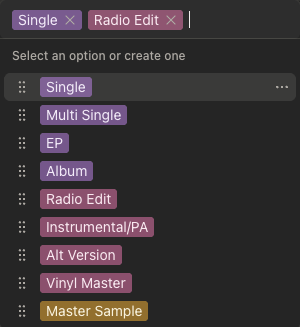
My list of project types, means I can at a glance check what’s needed in terms of deliverables and size, which may dictate time/scheduling of a project when onboarding.
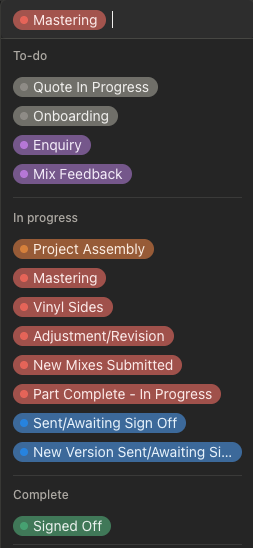
Similarly, the flow of a project is tracked via this stack of progress markers. Again this is always designed so at a glance, I know where I am and what needs to be addressed first. I flick to Notion countless times, and I always want a snap shot of my day, and the next, available.

Finally Billing Status, Invoice Sent Date (as we all have those clients we need to just gently remind sometimes!) and Notes, for anything Misc or details I need to keep in the forefront. This is a dynamic field that I will just drop things into as and when needed.
So there we have it! A snap shot of the more nuts a bolts of a projects admin. Some of you may feel its over the top, some of you may think it’s not detailed and refined enough! But the key thing I have learnt when building then refining this, is it works for me and works for how I work.
I have tired many different tools to do this workflow and its been shaped a number of times, but this is the most stable and consistent one I have used, and have been for about 4 years now. I’m sure there is more to add, new ideas to try and maybe you will all have some to share with me, so if that’s true please do!
I just hope this helps another engineer out, or inspirers someone to get on top of their own admin, as I know it is a total pain to do. We all got into these fields to stay away from jobs that required this sort of thing didn’t we! But I have to admit, this work flow does allow me to spend more time mastering, and less time faffing about in admin, so a little of it does help and ultimately gives you more time to just be creative.
Message back! Always up for a reply or a question, so do reach out!